
 МИ ПРАЦЮЄМО ДЛЯ УКРАЇНИ
Зміст
- Що таке Google My Business і навіщо він вашій компанії
- Як зареєструватися в Google My Business: покроково
- Налаштування Google My Business: що заповнити обов’язково
- Як просувати Google My Business: що реально працює
- Просування компанії в Google: три фактори ранжування
- Типові помилки, які зводять нанівець всі зусилля
- Як відстежувати результати
- Підсумок: з чого почати вже сьогодні
Що таке Google My Business і навіщо він вашій компанії
Коли ви шукаєте «перукарня поруч» або «сантехнік Київ», Google показує вам не просто сайти — він виводить картку з назвою, адресою, рейтингом, фото та телефоном. Це і є Google Business Profile.
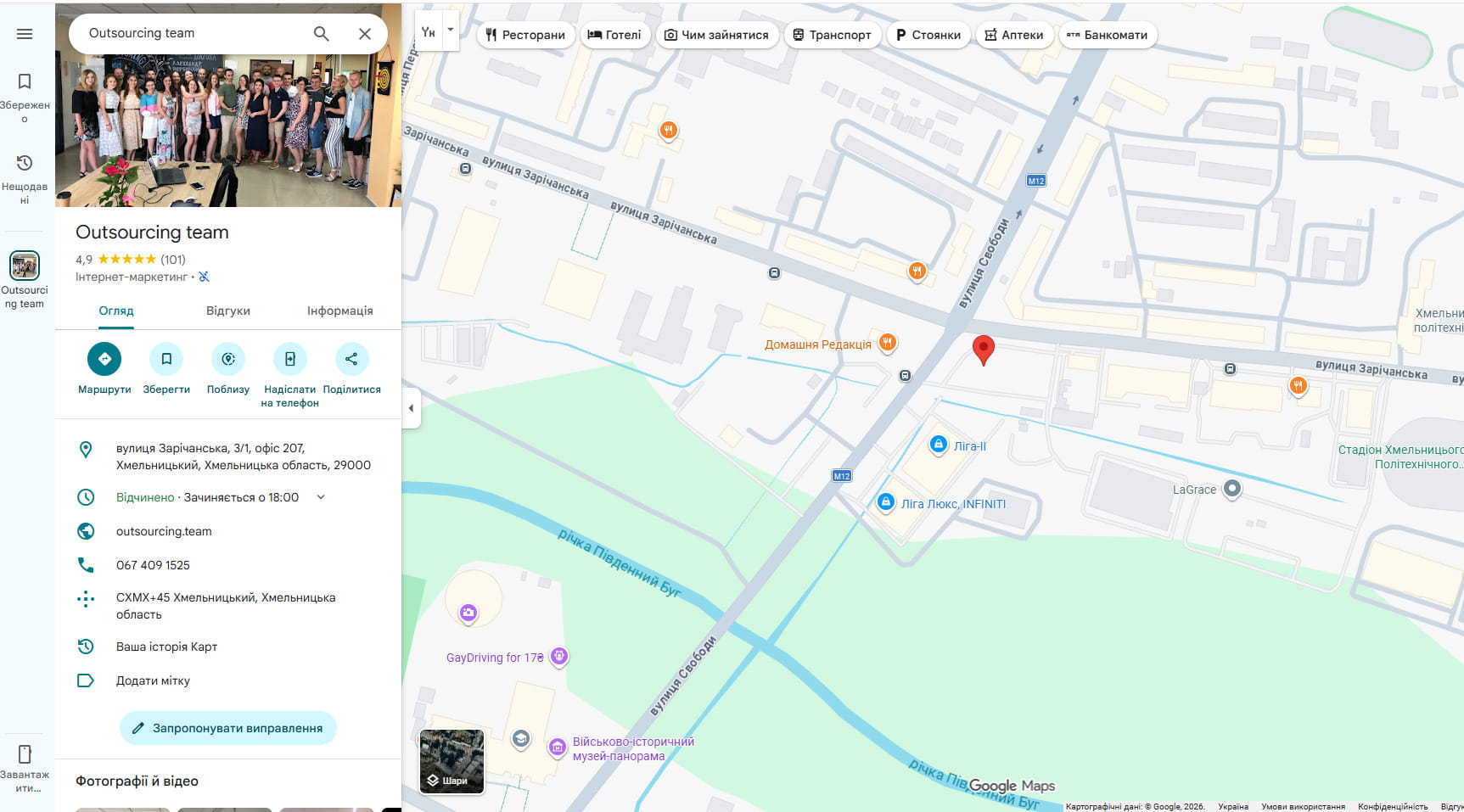
Google бізнес профіль — безкоштовний інструмент для управління тим, як компанія відображається у Google картах і пошуку. Для місцевого бізнесу добре налаштований профіль часто не менш важливий, ніж власний сайт.
Цифри говорять самі за себе:
- Компанії з повними та актуальними профілями у Google Business в 7 разів частіше залучають клієнтів та конвертують їх у покупки.
- Клієнти на 70% частіше відвідують і на 50% частіше розглядають покупку у бізнесу з повністю заповненим профілем.
- 83% споживачів шукають відгуки про місцеві компанії саме в Гугл.
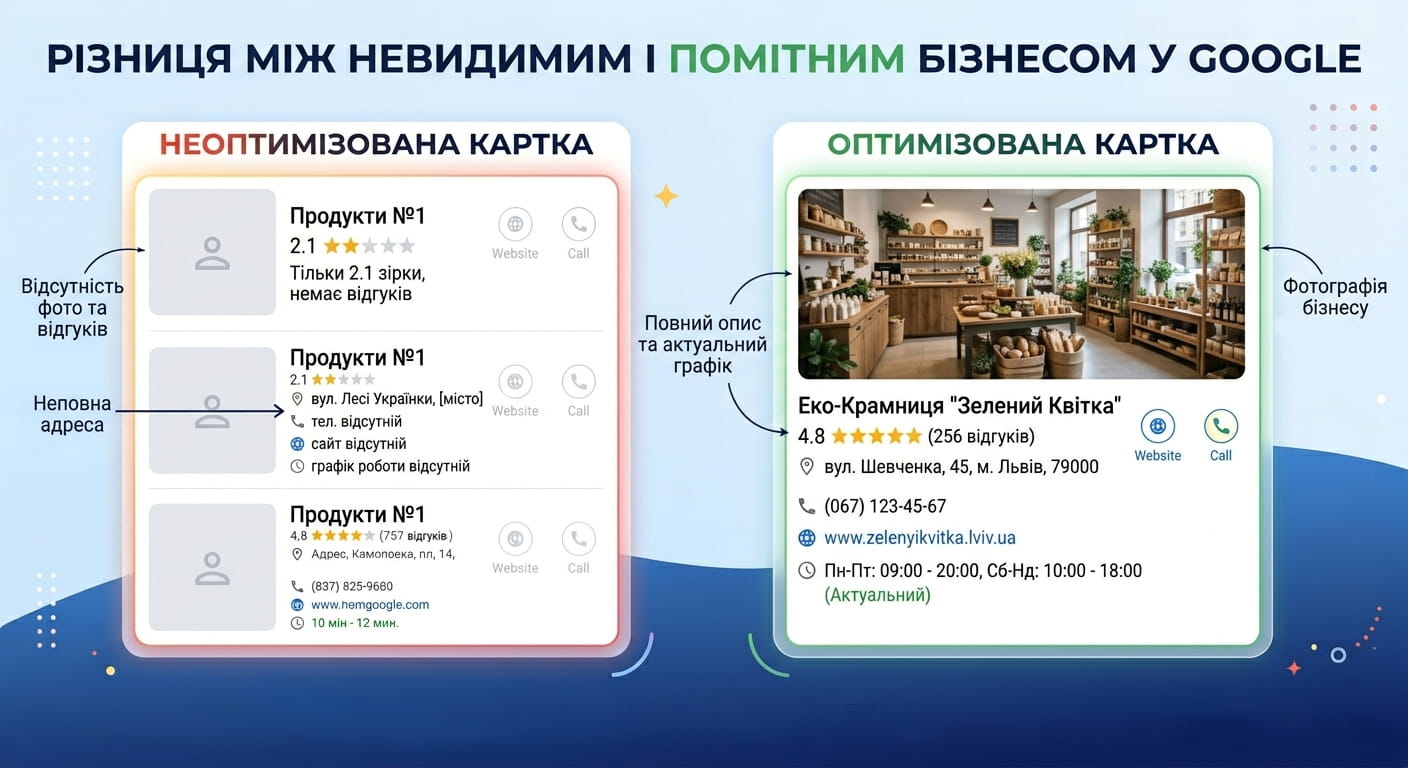
Якщо профілю немає або він порожній — компанія просто невидима для потенційних покупців.
Як зареєструватися в Google My Business: покроково
Щоб створити бізнес-акаунт у Гугл, не потрібні технічні знання. Весь процес займає від 15 до 30 хвилин.
Крок 1. Перевірте, чи є ваш профіль у Google
Перш ніж реєструватися в Google Бізнес, введіть назву вашої компанії у пошуковий рядок. Якщо профіль вже існує — його хтось міг створити автоматично або попередній власник. У такому разі натисніть «Це ваша компанія?» і підтвердіть право власності.
Крок 2. Створіть або заявіть профіль
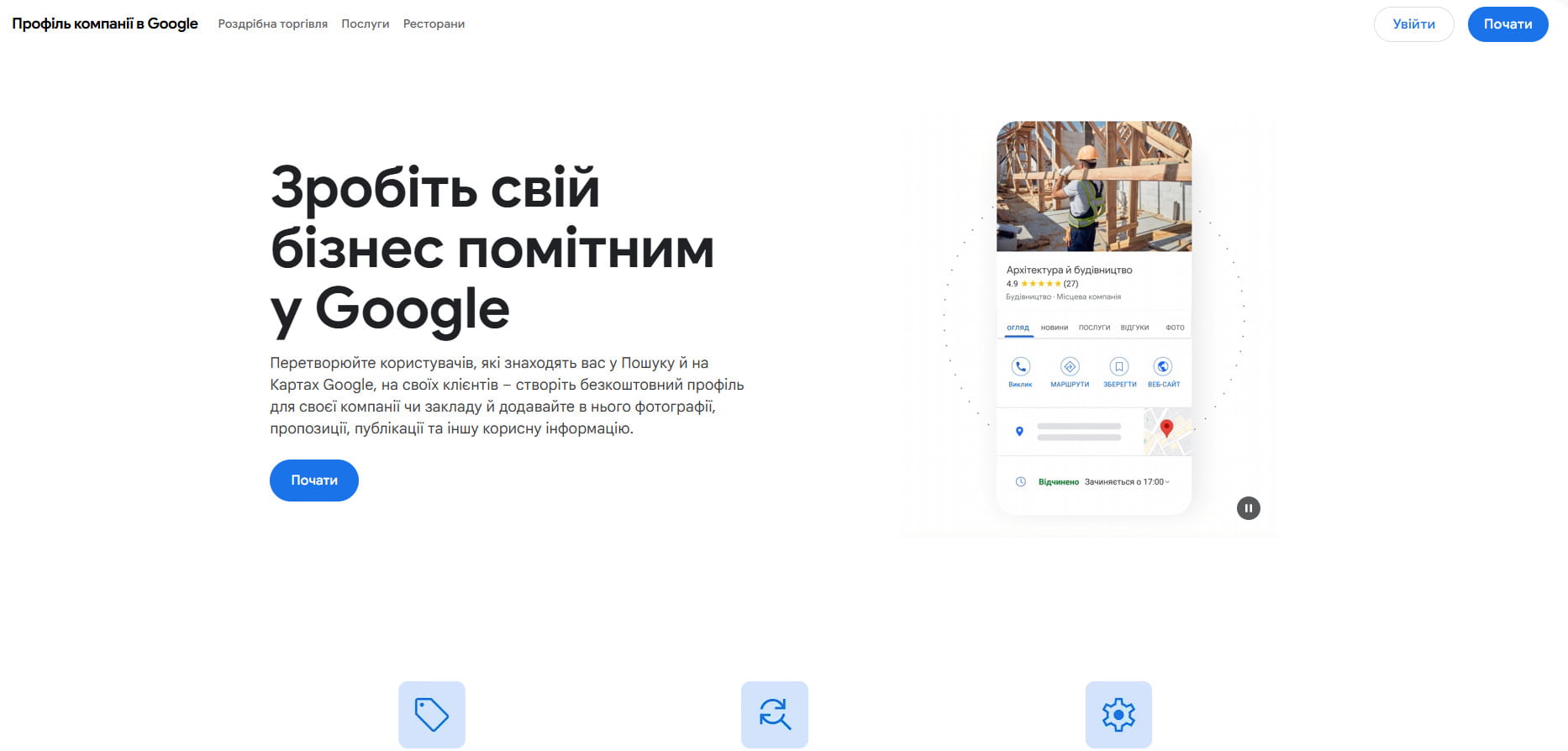
Перейдіть на сторінку business.google.com і натисніть «Почати». Вкажіть:
- офіційну назву компанії (саме так, як вона зареєстрована);
- категорію бізнесу — наприклад, «Стоматологічна клініка» або «Інтернет-магазин»;
- адресу або зону обслуговування (якщо ви виїжджаєте до клієнтів);
- номер телефону та адресу сайту.
Крок 3. Верифікуйте компанію
Верифікація — це підтвердження того, що ви справді представляєте цей бізнес. Гугл пропонує кілька способів:
| Спосіб верифікації | Час отримання | Підходить для |
| Листівка поштою | 5–14 днів | Фізичні адреси |
| Телефон або SMS | Миттєво | Якщо номер прив’язаний до адреси |
| Миттєво | Деякі категорії бізнесу | |
| Відеозапис | 1–3 дні | Нові вимоги Google 2024 |
У 2024 році Google посилив вимоги до верифікації: дублікати профілів, застаріла інформація або невідповідності можуть призвести до миттєвого блокування. Планка якості стала вищою, і профілі, що не відповідають вимогам, зникають з результатів пошуку.
Налаштування Google My Business: що заповнити обов’язково
Після верифікації починається головна робота. Ось що визначає, наскільки високо ваш бізнес з’явиться у пошуку.
Категорія бізнесу — найважливіший крок
Фахівці з локального пошуку одностайні: основна категорія у Google Business Profile — це чинник №1, що впливає на позицію в локальних результатах пошуку.
Обирайте категорію максимально точно. Якщо ви займаєтесь ремонтом квартир — не варто вибирати просто «Будівництво». Краще «Ремонт квартир» або «Оздоблювальні роботи». Google дозволяє обрати кілька категорій — використовуйте цю можливість.
Опис компанії
Напишіть 2–3 речення про те, чим ви займаєтеся та чому клієнти обирають саме вас. Не треба перераховувати ключові слова — пишіть для живої людини. Наприклад:
«Юридична фірма з 10-річним досвідом у сімейних та корпоративних справах. Консультуємо в Києві та дистанційно. Перша консультація безкоштовна.»
Фото та відео
Профілі з фотографіями отримують вдвічі більше довіри та приблизно на 35% більше кліків порівняно з профілями без зображень.
Що додавати:
- логотип і обкладинку
- фото офісу, магазину або виробництва зсередини і зовні
- знімки команди
- приклади робіт або продукції
Думка експерта: «Ми існуємо у вкрай візуальній інтернет-культурі. Якщо бізнеси вкладали б хоча б половину тих зусиль у побудову фотопортфоліо на GMB, що вони вкладають у Instagram, — їхні позиції були б значно кращими» — Клер Карлайл, експерт з локального маркетингу.
Як просувати Google My Business: що реально працює
Реєстрація — це лише початок. Просування компанії в Google через Business Profile вимагає системної роботи.
Відгуки клієнтів — ваш найпотужніший інструмент

Відгуки в Google у 2024 році становили 81% від усього обсягу онлайн-відгуків, що зробило Гугл домінуючим джерелом соціального підтвердження якості в майже кожній галузі.
Кожен додатковий відгук, який отримує бізнес, генерує в середньому 80 додаткових відвідувань сайту, 63 запити на прокладення маршруту та 16 телефонних дзвінків.
Як отримувати більше відгуків:
- просіть задоволених клієнтів залишити відгук одразу після завершення роботи
- надсилайте посилання на відгук у SMS або email-розсилці
- відповідайте на кожен відгук — і позитивний, і негативний
88% споживачів готові скористатися послугами бізнесу, якщо він відповідає і на позитивні, і на негативні відгуки. Натомість лише 47% розглянуть компанію, яка взагалі не реагує.
Думка експерта: «Google My Business Insights — не ідеальні, але вони вказують напрям. Це орієнтир, а не абсолютна істина» — Бен Фішер, сертифікований експерт Google My Business і співзасновник Steady Demand.
Публікації в профілі
Гугл бізнес профіль дозволяє публікувати новини, акції та анонси подій — прямо в картці компанії. Робіть це хоча б раз на 1–2 тижні. Це сигнал для Google, що профіль активний.
Питання та відповіді
У профілі є розділ Q&A — питання від відвідувачів. Не чекайте, доки хтось запитає. Самостійно додайте 5–10 найпоширеніших питань та дайте чіткі відповіді. Це економить час клієнтів і підвищує довіру.
Просування компанії в Google: три фактори ранжування
Google вирішує, кого показувати вище, за трьома критеріями:
- Релевантність — наскільки ваш профіль відповідає запиту. Чим повніше заповнений профіль, тим вища релевантність.
- Відстань — як далеко компанія від людини, яка шукає. Якщо хтось шукає «кав’ярня» — Google покаже ті, що поруч.
- Популярність — відгуки, посилання на сайт, активність профілю. За словами Google, рейтинг у органічній видачі також впливає на позиції в локальному пошуку — тому базові принципи SEO для сайту залишаються актуальними.
Компанії з першої трійки в локальному пакеті отримують на 126% більше трафіку та на 93% більше дій (дзвінків, кліків на сайт, запитів на маршрут) порівняно з тими, хто на позиціях 4–10.
Якщо ви хочете вивести бізнес у топ Гугл можна скористатися послугами професіоналів які займаються просуванням на Google Картах.
Типові помилки, які зводять нанівець всі зусилля
Ось що найчастіше заважає компаніям з’явитися у результатах пошуку:
- Неправильна категорія. Неправильна основна категорія — найбільший негативний чинник ранжування для локального пошуку.
- Застаріла інформація. 62% споживачів обрали б іншу компанію, якщо знайшли б некоректну інформацію в мережі.
- Відсутність відгуків або ігнорування їх. Мовчання у відповідь на негативний відгук — це репутаційна шкода.
- Порожній профіль без фото. Люди не довіряють компаніям без жодного зображення.
- Дублювання профілів. Два профілі на одну адресу — це порушення правил Google і ризик блокування.
Думка експерта:«Оптимізований Google Business Profile — це один із найефективніших способів залучити потенційних клієнтів без витрат на рекламу. Кожен невеликий крок окупається» — команда Aztek Web, агентство цифрового маркетингу.
Як відстежувати результати
Google Business Profile надає вбудовану аналітику. У розділі «Ефективність» ви побачите:
- скільки разів профіль з’явився у пошуку
- скільки людей перейшло на сайт
- скільки зателефонувало або запитало маршрут
- за якими запитами вас знаходять
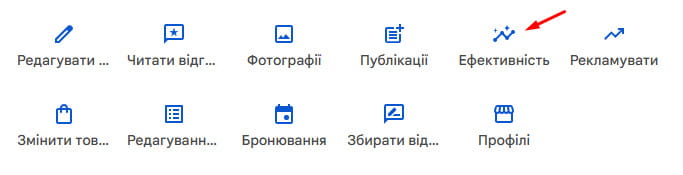
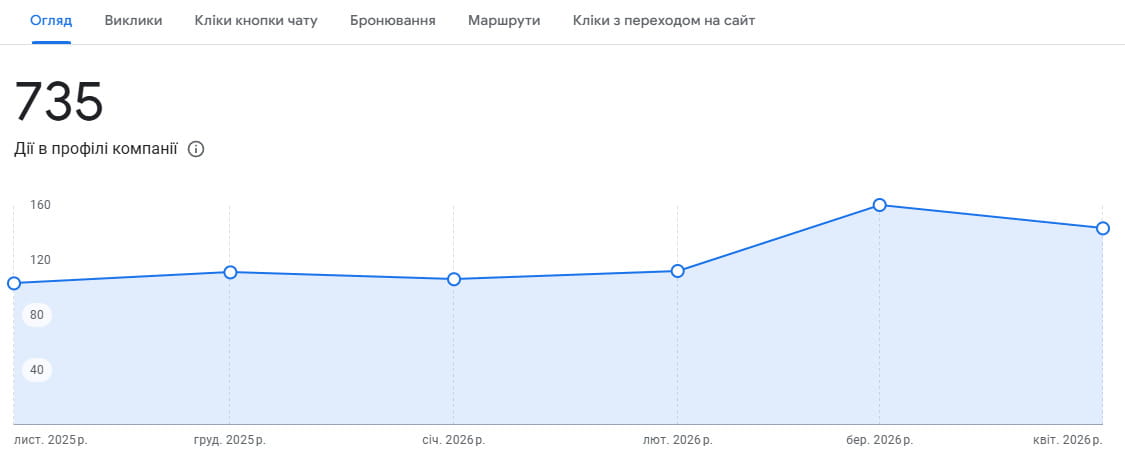
Типова компанія отримує 59 дій зі свого профілю Гугл бізнес щомісяця. 56% з них — переходи на сайт.
Відстежуйте ці показники раз на місяць. Якщо кількість переглядів зростає, а дій немає — проблема у наповненні профілю: додайте більше фото, відпрацюйте відгуки, оновіть опис.
Підсумок: з чого почати вже сьогодні
Щоб зареєструватися в Google Мій Бізнес і зробити компанію помітною у пошуку, дотримуйтесь цього плану:
- Зайдіть на business.google.com і створіть або заявіть профіль
- Пройдіть верифікацію — обирайте найшвидший доступний спосіб
- Заповніть всі поля: назва, категорія, опис, адреса, телефон, сайт, години роботи
- Завантажте мінімум 10 фотографій
- Попросіть перших клієнтів залишити відгук
- Публікуйте оновлення раз на 1–2 тижні
- Відповідайте на відгуки та питання
Налаштування Google My Business не вимагає бюджету — лише часу та послідовності. Компанії, які роблять це системно, отримують клієнтів безкоштовно, поки конкуренти витрачають гроші на рекламу.



коментарів